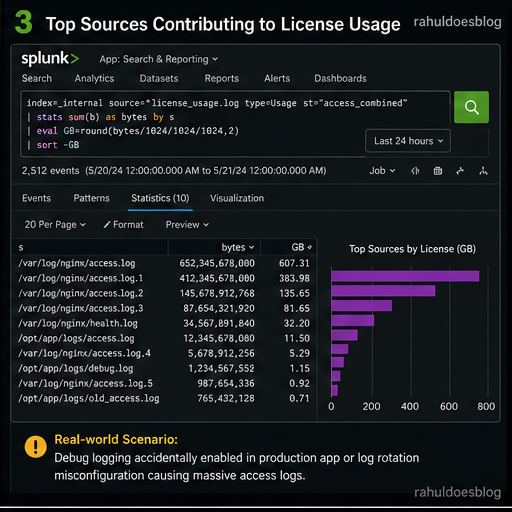
You log into Splunk one morning and see a license warning flashing on your dashboard.
“Daily license usage exceeded.”
Now the questions begin:
- Which data caused the spike?
- Was it expected or malicious?
- Which team or system is responsible?
As a Splunk analyst, your job isn’t just detection — it’s data control and cost optimization
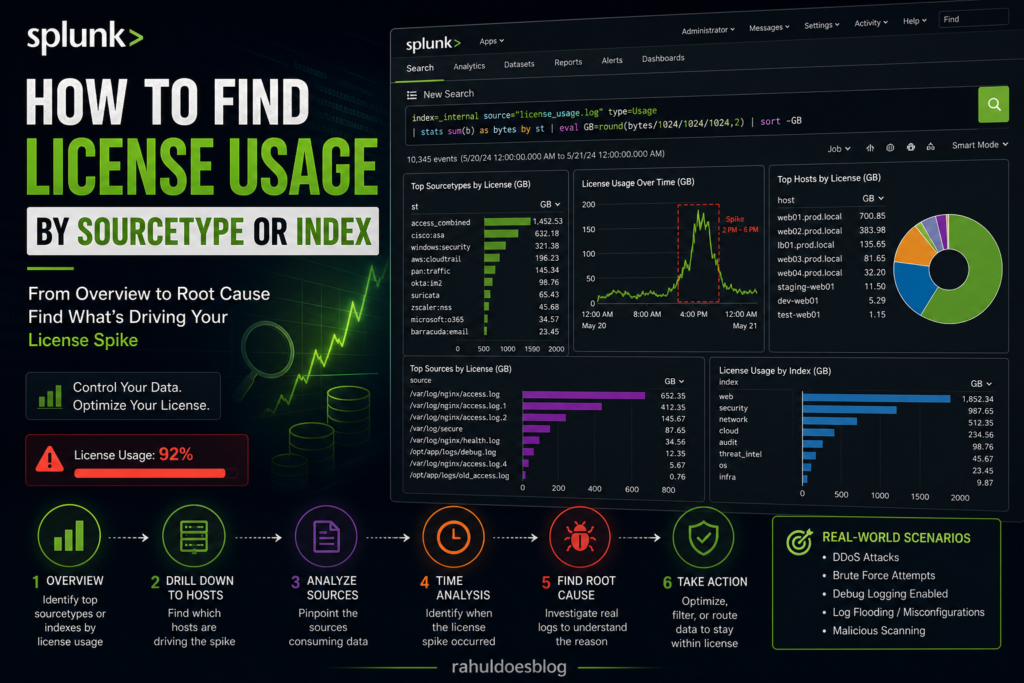
Step 1: Identify License Usage by Sourcetype
Your first move is to zoom out and understand which sourcetypes are consuming the most license
index=_internal source=*license_usage.log type=Usage
| stats sum(b) as bytes by st
| eval GB=round(bytes/1024/1024/1024,2)
| sort -GB
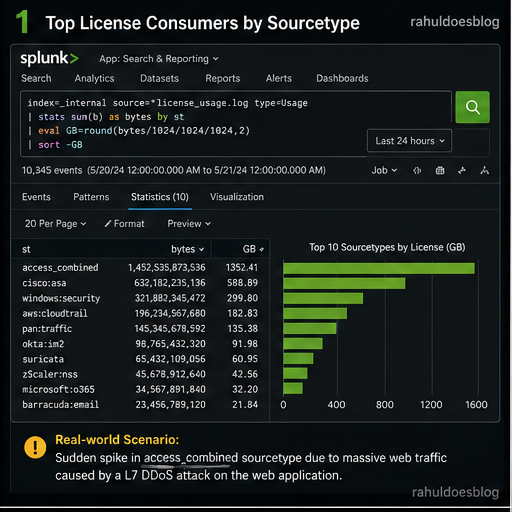
Step 2: Drill Down into a Problematic Sourcetype
Let’s say you find:
sourcetype=access_combinedsuddenly spiked
Now you go deeper.
index=_internal source=*license_usage.log type=Usage st="access_combined"
| stats sum(b) as bytes by h
| eval GB=round(bytes/1024/1024/1024,2)
| sort -GB
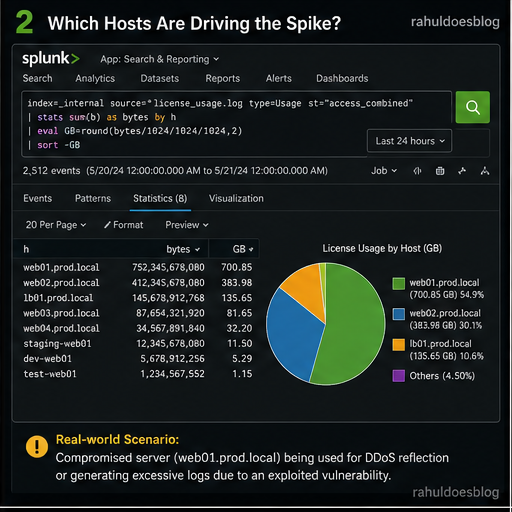
Step 3: Identify Source-Level Contribution
Now you want to pinpoint exact log files or inputs.
index=_internal source=*license_usage.log type=Usage st="access_combined"
| stats sum(b) as bytes by s
| eval GB=round(bytes/1024/1024/1024,2)
| sort -GB
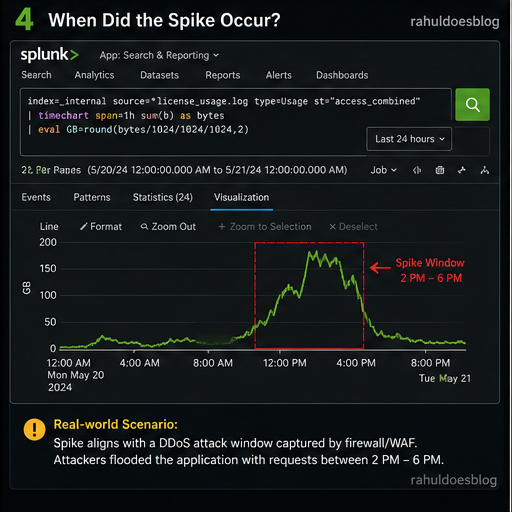
Step 4: Time-Based Spike Analysis
Now answer the most important question:
When did the spike happen?
index=_internal source=*license_usage.log type=Usage st="access_combined"
| timechart span=1h sum(b) as bytes
| eval GB=round(bytes/1024/1024/1024,2)
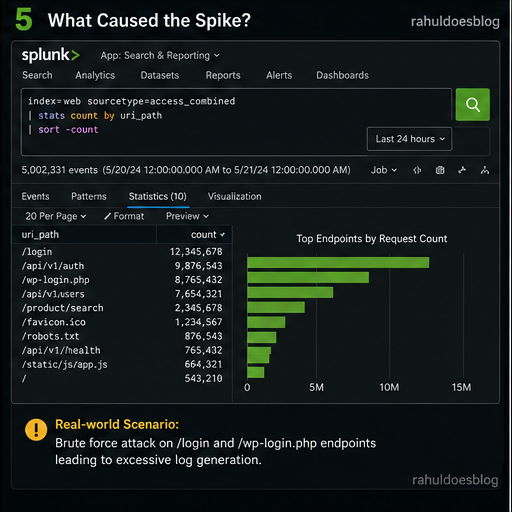
Step 5: Correlate with Actual Data
Now pivot to real data to understand why logs increased.
index=web sourcetype=access_combined
| stats count by uri_path
| sort -count
Analyst Thinking:
-
Sudden spike in
/api/login→ brute force? -
Huge traffic on
/healthcheck→ misconfigured monitoring? - Repeated logs → debug mode enabled?
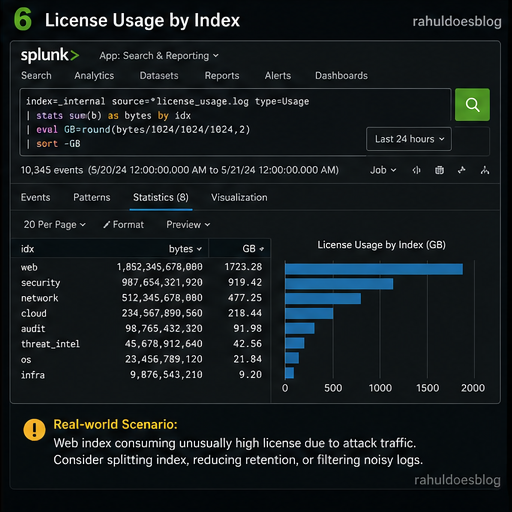
Step 6: Index-Level License Usage
Sometimes the problem isn’t sourcetype — it’s index design.
index=_internal source=*license_usage.log type=Usage
| stats sum(b) as bytes by idx
| eval GB=round(bytes/1024/1024/1024,2)
| sort -GB
Analyst Playbook: What to Do Next
Once you identify the root cause:
✅ If Expected:
- Scale license
- Move data to cheaper index
- Archive old logs
❌ If Unexpected:
- Disable noisy inputs
- Fix logging level (INFO → ERROR)
- Drop unnecessary fields using props/transforms
Final Thoughts
License monitoring isn’t just a Splunk admin task — it’s a core analyst responsibility.
Because:
More data ≠ Better visibility
Relevant data = Actionable intelligence
“The best analysts don’t just detect threats — they control the noise before it becomes one.”